
Choosing the right TPMS diagnostic tool with VIN scanner support can save time on sensor relearns, service resets, and guesswork at the wheel.
This roundup focuses on practical scan tools that help drivers and DIYers identify the right vehicle faster and work through common tire pressure system tasks with less hassle.
Best 10 TPMS Diagnostic Tools with VIN Scanner Picks for 2026
TPMS Programming Pick
THINKTPMS VENU90 TPMS OBD2 Scanner Diagnostic Tool

- Activates, reads, and relearns 315/433MHz sensors
- Programs only THINKCAR/MUCAR or pre-programmed sensors
- Adds full OBD2 diagnostics with Wi-Fi updates
Best For: DIY users who need dedicated TPMS service and basic OBD2 scanning
VIN-Finding Value
FOXWELL NT604 Elite OBD2 Scanner

- AUTOVIN quickly pulls VIN and vehicle info
- Scans engine, ABS, SRS, and transmission systems
- No software fee and includes live data
Best For: Drivers who want fast VIN lookup and common-system diagnostics
Workshop TPMS Upgrade
XTOOL TP300 TPMS Programming Tool

- TPMS activation, relearn, and programming in one tool
- Auto VIN plus 5-system diagnostics and live data
- Adds 8 service functions including Oil Reset and SAS
Best For: Shops and advanced users who want TPMS plus broader service resets
App-Based Scan Choice
BlueDriver OBD2 Scanner Bluetooth

- Wireless Bluetooth scanner for iPhone and Android
- Reads and clears TPMS, ABS, SRS, and engine codes
- Includes repair reports and videos with no subscription
Best For: Phone users who want easy wireless diagnostics and repair guidance
Shop-Style All-Rounder
OBD2 Scanner with 10 Resets and Auto VIN

- Auto VIN plus 4-system diagnosis for faster vehicle identification.
- TPMS reset included with 10 maintenance service functions.
- Bi-directional active tests for component-level troubleshooting.
Best For: DIYers who want a handheld scanner with TPMS and broad reset coverage
Wireless VIN Guide Pick
BlueDriver Bluetooth Scanner with VIN Repair Reports

- VIN-matched repair reports with verified fixes and definitions.
- Supports TPMS, ABS, SRS, transmission, and check engine on compatible cars.
- Bluetooth design works with iPhone and Android, no subscription required.
Best For: Drivers who want a wireless TPMS-capable scanner with VIN-based repair help
Balanced Reset Scanner
TOPDON AD600S with AutoVIN and TPMS Reset

- AutoVIN plus 4-system diagnostics for quicker setup.
- TPMS reset and eight other maintenance services included.
- Lifetime free updates add long-term value.
Best For: DIYers who want a handheld tool with TPMS reset and VIN identification
All-in-One DIY Pick
TOPDON AD500 with TPMS and AutoVIN

- AutoVIN for faster vehicle lookup
- TPMS reset plus 5 other maintenance resets
- Engine, ABS, SRS, and transmission coverage
Best For: DIY owners who want VIN lookup and broad reset coverage
Value Maintenance Scanner

- AutoVIN for quick VIN-based setup
- 9 reset functions including TPMS and injector coding
- Free lifetime Wi-Fi updates
Best For: Budget-minded users who want VIN lookup and maintenance resets
Feature-Rich Reset Tool
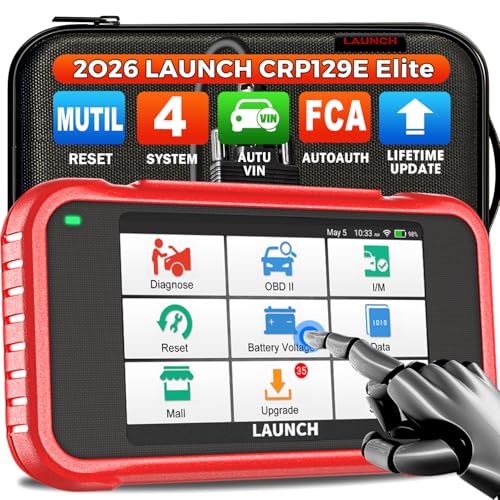
- Auto VIN for faster vehicle identification
- TPMS reset plus 7 other special functions
- Lifetime Wi-Fi updates with live data support
Best For: DIY users who want broad resets and VIN-based diagnostics
TPMS Programming Pick – THINKTPMS VENU90 TPMS OBD2 Scanner Diagnostic Tool
If you want one of the more focused TPMS diagnostic tools with VIN scanner features bundled into a compact handheld, the THINKTPMS VENU90 is built around tire sensor activation, reading, relearn, and limited programming. It also adds full OBD2/EOBD coverage, pre-installed software for 10,000+ vehicle models, and Wi-Fi updates, so it suits users who want a dedicated TPMS unit without relying on a phone app.
Best For: DIY owners and field mechanics who need TPMS service plus basic OBD2 diagnostics in one tool.
Pros:
- Activates, reads, and learns 315/433MHz TPMS sensors
- Supports sensor reading, fault-code clearing, and OBD-based relearn
- Includes full OBD2 functions like live data, freeze frame, EVAP, and I/M readiness
- No mobile app required, with Wi-Fi and SD-card update options
Cons:
- Programming is limited to THINKCAR/MUCAR sensors or pre-programmed sensors
- Pressure display is KPa only, not PSI
- Vehicle coverage varies and should be checked before ordering
Overall, the VENU90 makes sense if your priority is TPMS work first and general engine-code scanning second. It is not the most flexible sensor programmer, but its standalone design and broad vehicle software make it practical for routine tire service.
VIN-Finding Value – FOXWELL NT604 Elite OBD2 Scanner
The FOXWELL NT604 Elite is a straightforward choice if you want TPMS diagnostic tools with VIN scanner convenience, but also need coverage for ABS, SRS, transmission, and engine faults. Its AUTOVIN feature can pull vehicle info quickly, and the tool arrives ready to use with no software download required.
Best For: Car owners who want quick vehicle identification and common-system diagnostics without subscription fees.
Pros:
- AUTOVIN can retrieve VIN and vehicle info quickly
- Scans engine, ABS, SRS, and transmission systems
- Includes live data, built-in DTC library, data playback, and print support
- No extra software fee and comes with a protective case
Cons:
- Does not include maintenance functions like reset or relearn
- Crash/collision SRS data cannot be cleared
- AUTOVIN may not work on some older vehicles or certain brands
The NT604 Elite is best viewed as a dependable general diagnostic scanner with VIN lookup convenience, not a full service-tool replacement. If you mainly want to identify the vehicle fast and read common fault systems, it offers a lot for the money.
Workshop TPMS Upgrade – XTOOL TP300 TPMS Programming Tool
The XTOOL TP300 is aimed at users who want TPMS diagnostic tools with VIN scanner-style Auto VIN convenience plus broader shop-level coverage. It combines TPMS activation, relearn, and programming with Engine, ABS, SRS, and Transmission diagnostics, along with 8 reset functions and live data for a more complete maintenance workflow.
Best For: Tire shops, repair shops, and advanced DIY users who want TPMS service plus multi-system diagnostics.
Pros:
- Supports TPMS activation, programming, relearn, and sensor ID reading
- Includes Auto VIN, 5-system diagnostics, and 10 OBD2 functions
- Offers 8 service functions such as Oil Reset, EPB, SAS, and ABS bleeding
- Works with XTOOL TS100 sensors using four programming methods
Cons:
- Compatibility should be checked before purchase
- Programming is designed for XTOOL TS100 or pre-programmed sensors
- More feature-rich than basic DIY scanners, so it may be overkill for simple code reads
If you need a TPMS tool that does more than relearn tires, the TP300 is the most shop-oriented option here. Its combination of TPMS service, Auto VIN, and multiple reset functions makes it better suited to regular repair work.
App-Based Scan Choice – BlueDriver OBD2 Scanner Bluetooth
BlueDriver is a strong pick if you want TPMS diagnostic tools with VIN scanner support in a phone-based format. It connects by Bluetooth, uses the iOS or Android app, and provides enhanced diagnostics for ABS, airbag, SRS, and TPMS codes while also offering repair reports and live data.
Best For: Drivers who prefer a wireless scanner with app-based diagnostics and repair guidance.
Pros:
- Reads and clears TPMS, ABS, SRS, airbag, and engine codes
- Wireless Bluetooth connection with iPhone and Android support
- Includes unlimited repair reports and repair videos in the app
- No subscription fees or add-ons required
Cons:
- Requires a phone or tablet to use
- Works only with gas vehicles 1996+ sold in North America
- Does not include service functions such as reset or relearn
BlueDriver is best for users who want a simple wireless diagnostic setup and value app-based help more than a standalone handheld. It covers key trouble areas well, but it is more of an OBD2 and repair-report tool than a dedicated service scanner.
Shop-Style All-Rounder – OBD2 Scanner with 10 Resets and Auto VIN
If you’re comparing TPMS diagnostic tools with VIN scanner features, this Dollarfix unit goes well beyond basic code reading. It combines auto VIN identification with 4-system diagnosis, 10 maintenance resets, and bi-directional active tests, making it a strong pick for users who want more than just TPMS service support.
Best For: DIYers and home mechanics who want a handheld scan tool with TPMS reset plus broad service functions.
Pros:
- Includes TPMS reset along with oil, EPB, SAS, throttle, injector, DPF, and more service functions.
- Supports 4-system diagnostics for engine, ABS, SRS, and transmission.
- Auto VIN helps identify the vehicle quickly before scanning.
- Bi-directional active tests add useful control for component checking.
Cons:
- TPMS and other reset menus can vary by vehicle.
- Needs Wi-Fi/phone hotspot access for lifetime software updates.
This is a feature-heavy option for users who want a standalone scan tool with strong maintenance coverage. If you value VIN-based vehicle identification and broad reset capability, it offers a lot of tools in one package.
Wireless VIN Guide Pick – BlueDriver Bluetooth Scanner with VIN Repair Reports
For shoppers focused on TPMS diagnostic tools with VIN scanner support, BlueDriver stands out by pairing VIN-matched repair reports with enhanced diagnostics in a simple Bluetooth format. It is a practical choice if you want to read TPMS-related codes, check ABS and SRS data, and keep the setup compact by using your phone or tablet.
Best For: Drivers who want a wireless scanner with VIN-based repair guidance and no subscription fees.
Pros:
- Reads and clears enhanced codes for TPMS, ABS, SRS, airbag, transmission, and check engine on supported vehicles.
- Unlimited repair reports are matched to your VIN with definitions, causes, and verified fixes.
- Wireless Bluetooth design works with iPhone and Android.
- One-time purchase includes no subscription fees or add-ons.
Cons:
- Depends on a phone or tablet instead of having its own built-in screen.
- Enhanced coverage varies by vehicle support and model year.
BlueDriver is best if you prefer app-based diagnostics and want VIN-linked guidance without paying ongoing fees. It is less of a traditional handheld tool, but it offers a clean, easy workflow for everyday troubleshooting.
Balanced Reset Scanner – TOPDON AD600S with AutoVIN and TPMS Reset
The TOPDON AD600S is a strong choice if you want TPMS diagnostic tools with VIN scanner features in a compact handheld format. It adds automatic VIN identification, 4-system diagnostics, and nine reset services, including TPMS reset, so it works well for owners who want practical maintenance coverage without moving up to a full professional tablet.
Best For: DIY users and shop beginners who want TPMS reset, AutoVIN, and multiple maintenance functions.
Pros:
- Includes TPMS reset plus other service functions like oil, brake, BMS, SAS, DPF, throttle, and ABS bleeding.
- AutoVIN can identify the vehicle without manual entry on supported cars.
- 4-system diagnostics cover engine, ABS, SRS, and transmission.
- Lifetime free updates and Wi-Fi updating add long-term value.
Cons:
- Function menus vary by vehicle make, model, and year.
- AutoVIN does not work on all cars.
Overall, the AD600S is a balanced pick for users who want VIN-based identification and a useful set of reset services in one scan tool. It is especially appealing if TPMS reset is part of your regular maintenance routine.
All-in-One DIY Pick – TOPDON AD500 with TPMS and AutoVIN
If you want TPMS diagnostic tools with VIN scanner features in one handheld unit, the TOPDON AD500 is a practical step up from a basic code reader. It combines 4-system diagnostics with six reset services, so it can handle common maintenance tasks while also helping you pull vehicle details quickly with AutoVIN.
Best For: DIY drivers who want broad maintenance resets, VIN lookup, and everyday multi-system coverage.
Pros:
- AutoVIN helps speed up vehicle selection and diagnostic setup.
- Includes TPMS reset plus oil, SAS, BMS, EPB, and throttle adaptation functions.
- Reads engine, transmission, ABS, and SRS systems with live data charts.
- 5-inch screen, touchscreen + buttons, and 2GB RAM/32GB ROM for smoother use.
Cons:
- Focused on DIY maintenance rather than advanced professional-level service coverage.
- Some vehicle support and language features depend on compatibility.
The AD500 is a strong fit if you want a balanced scanner that goes beyond code reading and includes key tire-pressure and VIN-based workflow features. Its mix of reset functions and multi-system diagnostics makes it especially useful for routine garage work.
Value Maintenance Scanner – TOPDON AD600S with TPMS Reset
The TOPDON AD600S is a straightforward choice if you’re comparing TPMS diagnostic tools with VIN scanner support and want a lot of maintenance functions without moving into a higher-end platform. It offers 4-system diagnostics, AutoVIN, and nine reset services, including TPMS reset and injector coding.
Best For: Drivers who want a budget-friendly maintenance scanner with AutoVIN and strong reset coverage.
Pros:
- AutoVIN automatically fetches the vehicle VIN to streamline diagnostics.
- Includes TPMS reset along with oil, BMS, ABS, SAS, EPB, DPF, throttle, and injector coding functions.
- Supports engine, transmission, ABS, and SRS diagnostics with live data.
- Lifetime free Wi-Fi updates and support for 67+ brands and 10,000+ models.
Cons:
- No mention of advanced bidirectional controls or professional programming features.
- Compatibility should still be confirmed for specific vehicles before purchase.
For routine maintenance and common repair tasks, the AD600S offers a lot of capability for the price class. It is best viewed as a practical everyday scanner that keeps the focus on resets, VIN lookup, and basic system checks.
Feature-Rich Reset Tool – LAUNCH CRP129E with Auto VIN
If your search is centered on TPMS diagnostic tools with VIN scanner support, the LAUNCH CRP129E stands out for packing in reset coverage and update support. It combines Auto VIN, 4-system diagnostics, and eight special functions, including TPMS reset and DPF regeneration.
Best For: DIY repair users who want a broad-feature scanner with Auto VIN and strong reset support.
Pros:
- AutoVIN helps identify compatible vehicles quickly, especially for 2006+ models.
- Includes TPMS reset plus oil, EPB, SAS, throttle, BMS, DPF regeneration, and injector coding.
- Supports engine, transmission, ABS, and SRS diagnostics with live data recording.
- Lifetime Wi-Fi updates and FCA SGW Autoauth support add long-term usefulness.
Cons:
- Some features, such as FCA SGW access, require additional setup or purchase.
- Function depth is aimed at maintenance and diagnostics, not full shop-level programming.
The CRP129E is a good fit if you want one scanner that can cover TPMS-related work and a wider range of maintenance tasks. Its Auto VIN function and frequent updates make it a sensible long-term pick for at-home diagnostics.
How We Picked These TPMS Diagnostic Tools with VIN Scanner
We focused on tools that combine TPMS functions with broader diagnostic coverage, since most buyers need more than one job from a single scanner. Priority went to models with clear vehicle identification, common reset support, practical TPMS relearn or activation features, and a feature set that fits real garage use.
We also favored scanners that balance ease of use, update support, and multi-system coverage. For most shoppers, the best value is not the most advanced tool on paper, but the one that reliably handles TPMS work and the everyday checks you actually perform.
Quick Comparison
At a high level, these TPMS Diagnostic Tools with VIN Scanner fall into a few groups: basic-to-midrange code readers with TPMS and service resets, app-based Bluetooth scanners for simple portability, and more advanced tablet-style tools with broader system access and bidirectional features. If you want quick fault reads and relearn support, a simpler tool may be enough. If you handle multiple vehicles or perform more service tasks, choose a scanner with stronger reset coverage and deeper diagnostics.
Key Buying Factors for TPMS Diagnostic Tools with VIN Scanner
VIN Identification and Vehicle Coverage
VIN lookup can speed up setup and reduce menu mistakes, especially when you work on different makes and model years. Confirm that the scanner supports the vehicles you service most often, including any needed protocol support such as CAN-FD for newer cars.
TPMS Functions You Actually Need
Look for the specific TPMS tasks that matter to you: sensor activation, sensor reading, relearn guidance, and, if needed, programming support. Not every tool does all of these equally well, and some are better at service guidance than sensor programming.
Reset and Service Coverage
Many buyers choose these scanners for the extra maintenance functions beyond tires. Oil, EPB, SAS, throttle, BMS, ABS, and SRS coverage can make one tool far more useful than a TPMS-only device.
App Vs. Standalone Design
Bluetooth scanners are convenient and often affordable, but they depend on a phone and app experience. Handheld scanners offer a more self-contained workflow, which can be better in a busy shop or garage with weak connectivity.
Who Should Buy Which TPMS Diagnostic Tools with VIN Scanner?
If you mainly need straightforward TPMS checks and occasional code reading, a compact scanner with VIN support and a few reset functions is usually enough. DIY owners who want broader maintenance coverage should look at midrange tools with multiple service resets and TPMS relearn help.
If you work on several vehicles, want deeper diagnostics, or plan to use the scanner regularly, step up to a more advanced model with stronger system access, faster identification, and better service flexibility. In short, match the tool to how often you’ll use it and how many repair jobs you expect it to handle.