
If you’re looking to enhance your vehicle diagnostics, finding the right OBD2 wireless adapter for your Android device is essential. These devices can make it easy to monitor your car’s health and troubleshoot issues from the comfort of your own home. But with so many options available, how do you choose the best one for your needs? Let’s explore the top contenders that stand out in 2026.
Veepeak OBDCheck BLE Bluetooth OBD II Scanner for iOS & Android

The Veepeak OBDCheck BLE Bluetooth OBD II Scanner is an excellent choice for Android users who want a straightforward, wireless solution to diagnose their vehicles. This scanner works with most 1996+ OBD-II compliant cars, letting you read and clear trouble codes easily. You can view live sensor data and I/M readiness without hassle. With Bluetooth connectivity, just plug it in, open the app, and you’re ready to go—no pairing needed! While it supports various apps like Car Scanner, keep in mind that advanced diagnostics and some functionalities may require additional purchases or are limited to specific makes and models.
Best For: Android users seeking a simple and wireless OBD-II diagnostic tool for their vehicles.
Pros:
- Easy to use with no pairing required; just plug in and connect via Bluetooth.
- Compatible with most 1996+ OBD-II compliant vehicles, covering a wide range of cars.
- Provides essential functions such as reading and clearing trouble codes, viewing live sensor data, and I/M readiness.
Cons:
- Advanced diagnostics for systems like ABS and SRS are limited and may require specific apps.
- Some functionalities may require additional purchases or are restricted to certain makes and models.
- Special functions like injector coding and service resets are not supported.
BlueDriver Bluetooth Pro OBDII Scan Tool for iPhone & Android

If you’re looking for an extensive diagnostic tool that works seamlessly with your smartphone, the BlueDriver Bluetooth Pro OBDII Scan Tool is a perfect choice. This adapter diagnoses over 7,000 issues, including ABS and SRS, on North American gas-powered vehicles from 1996 onward. You can read and clear trouble codes while accessing live data for real-time vehicle health monitoring. Plus, it connects via Bluetooth, so you won’t deal with wires. With unlimited repair reports, a vast video database, and 24/7 professional support, you get thorough assistance without any subscription fees. It’s user-friendly and efficient!
Best For: Car owners and DIY mechanics looking for a comprehensive and user-friendly diagnostic tool for their vehicles.
Pros:
- Advanced diagnostics for over 7,000 issues, including ABS and SRS codes.
- Real-time health monitoring provides continuous access to important vehicle information.
- No subscription fees or hidden costs, with unlimited repair reports and 24/7 professional support.
Cons:
- May not support certain non-gas-powered vehicles or older models.
- Bluetooth connectivity may experience occasional interference in certain environments.
- Requires a smartphone or tablet to access features, which may not appeal to all users.
OBDLink MX+ OBD2 Bluetooth Scanner for iPhone, Android, and Windows

For those looking for a versatile OBD2 scanner that works seamlessly with iPhone, Android, and Windows devices, the OBDLink MX+ stands out as an excellent choice. It supports various apps like FORScan, Torque, and BimmerCode, making it perfect for diverse needs. With enhanced OEM support for major manufacturers like Ford and Toyota, you can easily clear the Check Engine Light and access live parameters. Weighing just under an ounce, its compact design offers convenience without sacrificing performance. Plus, with a 4.6-star rating from nearly 15,000 reviews, it’s a top pick in the automotive category.
Best For: Those seeking a reliable and versatile OBD2 scanner compatible with multiple devices, including iPhone, Android, and Windows.
Pros:
- Enhanced OEM support for major automotive brands like Ford, GM, and Toyota.
- Compact and lightweight design, making it easy to carry and store.
- High customer satisfaction with a 4.6-star rating from nearly 15,000 reviews.
Cons:
- May require additional apps for full functionality, which could incur extra costs.
- Limited compatibility with some less common vehicle models.
- Firmware updates necessary for optimal performance, requiring occasional user intervention.
Veepeak OBDCheck BLE+ Bluetooth OBD II Scanner for iOS & Android

Designed for car enthusiasts and DIY mechanics, the Veepeak OBDCheck BLE+ Bluetooth OBD II Scanner offers an easy-to-use wireless solution for diagnosing vehicles. It works with most 1996 and newer cars and light trucks in the US, providing essential OBD-II functions like reading and clearing trouble codes. Its Bluetooth connectivity is hassle-free, requiring no pairing for Bluetooth LE, allowing you to connect to your favorite apps like Car Scanner and Torque. With a compact design and a solid customer rating of 4.5 stars, this scanner is a reliable tool for your automotive needs, though advanced diagnostics may be limited.
Best For: Car enthusiasts and DIY mechanics looking for a reliable and easy-to-use OBD-II diagnostic tool.
Pros:
- Compact design makes it easy to store and transport.
- Bluetooth connectivity allows for a hassle-free connection without pairing.
- High customer satisfaction with a rating of 4.5 stars from over 10,000 reviews.
Cons:
- Limited support for advanced diagnostics such as ABS or SRS.
- Some app compatibility restrictions, particularly for advanced features and specific car models.
- Not all functions are supported, such as special resets and sensor data for certain vehicles.
Veepeak Mini Bluetooth OBD2 Scanner for Android

The Veepeak Mini Bluetooth OBD2 Scanner for Android is perfect for car enthusiasts who want a straightforward way to monitor their vehicle’s performance without the hassle of wires. This compact device connects seamlessly with most 1996+ OBD-II compliant vehicles, providing essential functions like reading and clearing trouble codes, viewing live sensor data, and monitoring fuel economy. However, it’s worth noting that it’s not compatible with iOS devices or advanced diagnostics for ABS and SRS systems. You’ll need a compatible third-party app, like Car Scanner or Torque, to access its full potential. Always check compatibility before purchasing!
Best For: Car enthusiasts looking for a wireless solution to monitor their vehicle’s performance with basic OBD-II functions.
Pros:
- Compact and wireless design for easy use and portability.
- Compatible with most 1996+ OBD-II vehicles for broad applicability.
- Provides essential functions like reading and clearing trouble codes and live sensor data.
Cons:
- Not compatible with iOS devices, limiting use to Android only.
- Advanced diagnostics for ABS and SRS systems are not supported, restricting functionality for certain users.
- Requires a compatible third-party app for operation, which may involve additional steps for setup.
Vgate iCar Pro Bluetooth OBD2 Fault Code Reader

If you’re looking for a reliable and user-friendly OBD2 scanner, the Vgate iCar Pro Bluetooth OBD2 Fault Code Reader stands out with its seamless app integration that eliminates the hassle of Bluetooth pairing. Compatible with iOS, Android, and Windows, it works with popular apps like Torque and OBD Fusion. This compact device fits most OBD2 ports since 1996, making it ideal for 12V petrol and light diesel vehicles. With low power consumption and auto sleep functions, it’s efficient too. Plus, the solid customer ratings reflect its reliability and performance, making it a smart choice for any car owner.
Best For: Car owners looking for an efficient and easy-to-use OBD2 scanner compatible with a variety of devices and apps.
Pros:
- Compact design that easily fits most OBD2 ports since 1996.
- Seamless app integration without the need for Bluetooth pairing.
- Low power consumption with auto sleep functions enhances efficiency.
Cons:
- Not compatible with 24V power diesel cars.
- Auto wake function is not supported for electric/hybrid vehicles.
- Some popular OBD apps may require additional fees for full functionality.
SinoTrack OBD2 Scanner Bluetooth Auto Diagnostic Scan Tool

For those looking for an affordable and user-friendly diagnostic tool, the SinoTrack OBD2 Scanner Bluetooth Auto Diagnostic Scan Tool stands out. This compact device connects easily to your OBD2 port, allowing you to access fault codes, live data, and various tests like oxygen sensor and battery voltage checks. It supports 16 languages and is compatible with vehicles from 1996 onward, though not with hybrids or electric cars. With fast, accurate diagnostics and a 24-hour customer support line, you’ll save money by diagnosing issues before heading to a mechanic. Plus, it comes with a 2-year warranty for peace of mind.
Best For: The SinoTrack OBD2 Scanner is best for car owners seeking an affordable, user-friendly tool for diagnosing vehicle issues without the need for professional assistance.
Pros:
- Compact and easy to use with plug-and-play functionality.
- Supports 16 languages and is compatible with most vehicles from 1996 onwards.
- Provides fast and accurate diagnostics, helping to save money on repairs.
Cons:
- Not compatible with hybrid, electric, or pure electric vehicles.
- Cannot read transmission temperature, limiting some diagnostic capabilities.
- Specific connection instructions required for iOS users due to limitations.
2026 Bluetooth OBD2 Scanner for iPhone & Android
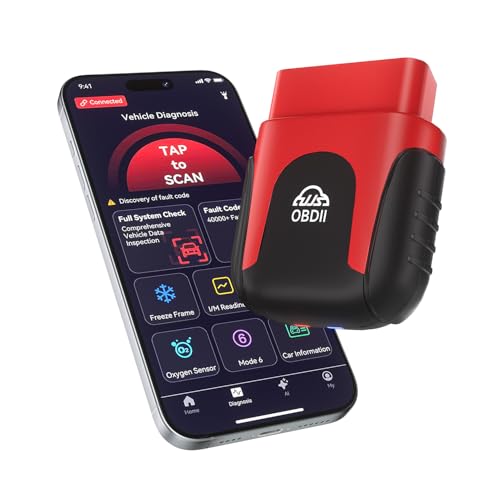
Looking for a reliable Bluetooth OBD2 scanner that works seamlessly with both iPhone and Android devices? The 2026 Bluetooth OBD2 scanner fits the bill perfectly. It’s compatible with all OBD2 vehicles from 1996 and newer, and its free app offers lifetime updates with over 35,901 fault codes. Enjoy AI-powered diagnostics that analyze live data and generate easy-to-understand health reports. Monitor real-time engine performance, and use the one-tap full vehicle scan feature for quick checks. Its ultra-compact design guarantees convenience, while Bluetooth 5.4 connectivity eliminates the hassle of cables. Plus, enjoy a lifetime warranty for peace of mind.
Best For: Car enthusiasts and everyday drivers looking for an easy-to-use OBD2 scanner that provides comprehensive diagnostics and real-time engine monitoring.
Pros:
- Supports all OBD2 vehicles from 1996 and newer, making it versatile for a wide range of cars and trucks.
- AI-powered diagnostics provide accessible health reports and repair advice without requiring mechanical expertise.
- Ultra-compact design and Bluetooth connectivity offer convenience and ease of use without the need for additional cables.
Cons:
- May require a smartphone with a compatible operating system for full functionality.
- Limited to OBD2 protocol vehicles, which excludes some older models or non-OBD2 compliant vehicles.
- The reliance on a smartphone app may not appeal to users who prefer standalone devices.
Vgate iCar Pro OBD2 Scanner Bluetooth Code Reader

The Vgate iCar Pro OBD2 Scanner Bluetooth Code Reader stands out as the ideal choice for tech-savvy car owners who want seamless diagnostics on their Android devices. With its fast 38.4Kbps data transfer, this adapter guarantees efficient performance. You’ll appreciate its safety features, including over-voltage and over-current protection, along with an auto-sleep function to conserve battery. It allows you to read and clear engine codes, view real-time sensor data, and estimate fuel economy. Plus, it’s compatible with popular apps like Torque and OBD Fusion, making it versatile for your diagnostic needs. Enjoy peace of mind with a one-year warranty and support.
Best For: Tech-savvy car owners looking for an efficient and versatile OBD2 scanner for their Android devices.
Pros:
- Fast 38.4Kbps data transfer for efficient performance.
- Includes multiple safety features such as over-voltage and over-current protection.
- Compatible with popular diagnostic apps like Torque and OBD Fusion for enhanced functionality.
Cons:
- Some advanced features may require additional fees when using third-party apps.
- Compatibility with certain vehicles for advanced diagnostics like anti-lock braking systems may vary.
- Limited support for iOS and Windows compared to Android devices.
NEXAS NexLINK Bluetooth OBD2 Scanner for Car
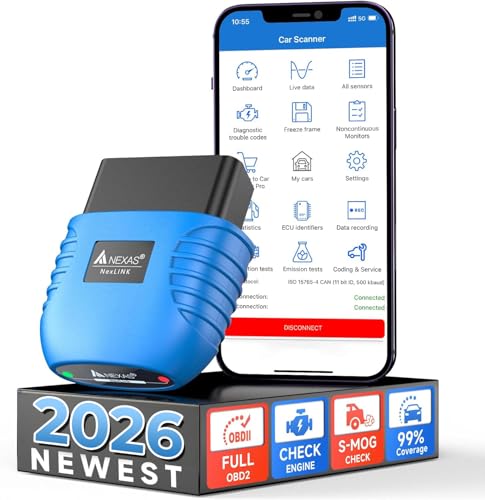
Designed for car enthusiasts and everyday drivers alike, the NEXAS NexLINK Bluetooth OBD2 Scanner offers extensive compatibility with a wide range of vehicles, from popular brands like Toyota and Ford to luxury options like BMW and Audi. It accurately diagnoses Check Engine Light issues and provides real-time data, making it easy for you to perform diagnostics at home. Plus, it doubles as a motorcycle scanner with compatible apps, saving you the hassle of owning multiple devices. With low-power technology and solid safety features, this scanner guarantees your vehicle’s battery stays protected while you gain valuable insights into its performance.
Best For: Car enthusiasts and everyday drivers looking for a versatile and user-friendly diagnostic tool compatible with a wide range of vehicles.
Pros:
- Supports extensive vehicle compatibility, including both domestic and luxury brands.
- Offers real-time diagnostics and performance tests, enabling home troubleshooting.
- Functions as a motorcycle scanner with compatible apps, eliminating the need for multiple devices.
Cons:
- Some third-party apps may require additional purchases for full functionality.
- Limited to Android devices for motorcycle features, which may exclude some users.
- Performance may vary depending on the specific vehicle model and make.
Factors to Consider When Choosing OBD2 Wireless Adapters for Android
When you’re picking an OBD2 wireless adapter for your Android device, there are several essential factors to keep in mind. You’ll want to guarantee compatibility with your vehicle, check the supported OBD-II functions, and consider the connectivity options available. Additionally, app compatibility and the diagnostic capabilities offered can greatly impact your experience.
Compatibility With Vehicles
Choosing an OBD2 wireless adapter for your Android device requires careful consideration of vehicle compatibility to guarantee peak performance. First, make certain the adapter works with vehicles manufactured from 1996 onward, as this aligns with OBD-II standards. It’s vital to check for specific vehicle make and model support since some adapters offer enhanced features for certain brands. Additionally, confirm that the adapter can interface with both gasoline and diesel vehicles, avoiding those limited to one type or that exclude hybrids and electrics. Finally, verify it can read and clear a variety of diagnostic trouble codes (DTCs) and offers functionalities like real-time data monitoring and I/M readiness status checks for thorough diagnostics.
Supported OBD-II Functions
To guarantee you get the most out of your OBD2 wireless adapter, it’s vital to prioritize the supported functions it offers. First, verify the adapter can read and clear trouble codes for the check engine light (CEL) and view live sensor data. Advanced diagnostic capabilities are also key—look for support for ABS, SRS, and TPMS codes for thorough vehicle diagnostics. Additionally, check if it provides I/M readiness status and freeze frame data, which are essential for emissions testing and troubleshooting intermittent problems. Don’t forget to evaluate compatibility with third-party apps, as some functions may only work with specific applications. Finally, consider any limitations regarding manufacturer-specific functions and special resets, as these can vary greatly.
Connectivity Options Available
Understanding the supported OBD-II functions lays the groundwork for selecting the right OBD2 wireless adapter, but connectivity options greatly influence your experience. Most adapters utilize Bluetooth technology, often supporting both Bluetooth Low Energy (BLE) and classic Bluetooth protocols. Confirm the adapter’s compatibility with your Android device, as some may only work with specific Bluetooth versions or Android OS. Most Bluetooth OBD2 adapters connect directly to a smartphone app without manual pairing, enhancing user convenience. Also, check compatibility with your vehicle’s OBD-II protocols, as some adapters might have limitations based on your car’s make or model. Finally, consider the Bluetooth range, which typically spans 30 to 100 feet, as this can impact how and where you perform diagnostics.
App Compatibility Requirements
While selecting an OBD2 wireless adapter for your Android device, ensuring compatibility with popular diagnostic apps is essential for maximizing functionality. Check if the adapter supports apps like Torque, Car Scanner ELM OBD2, and OBD Fusion to access the features you want. Some adapters might not enable advanced or manufacturer-specific functions unless paired with specific apps, so verifying those requirements is vital. Also, make sure the chosen adapter doesn’t require specialized hardware, as this can limit its performance and increase costs. Be aware that certain apps may have additional fees for premium features, which can affect your overall expense. Finally, confirm that the adapter supports the necessary Bluetooth version for seamless connectivity with your Android device.
Diagnostic Capabilities Offered
When choosing an OBD2 wireless adapter for your Android device, consider the range of diagnostic capabilities it offers. Some adapters only read and clear check engine light codes, while others explore advanced diagnostics, covering ABS, SRS, and live data monitoring. Look for models that provide real-time access to parameters like RPM and coolant temperature to help identify intermittent issues. Adapters with extensive fault code libraries can diagnose over 7,000 potential problems, whereas basic models may have limited definitions. Higher-end options often include features like freeze frame data and O2 sensor tests for more thorough assessments. Additionally, compatibility with third-party apps can enhance functionality, offering customized dashboards and advanced performance analysis.