
Choosing the right TPMS tool can save time, reduce comebacks, and make tire service far more efficient. The best options do more than reset lights—they help you activate, read, relearn, and, in some cases, program sensors for a wide range of vehicles.
This roundup focuses on TPMS programming tools for aftermarket sensors, with picks for DIY users, mobile techs, and professional shops that want reliable coverage and simple workflows.
Best 10 TPMS Programming Tools for Aftermarket Sensors Picks for 2026
Wi-Fi Upgrade Pick
Autel TS508WF TPMS Programming Tool

- Wi-Fi updates without a PC
- Programs Autel MX-Sensors in 4 ways
- Quick and Advanced service modes
Best For: Wi-Fi TPMS service for Autel MX-Sensors
Multi-Brand Value Pick
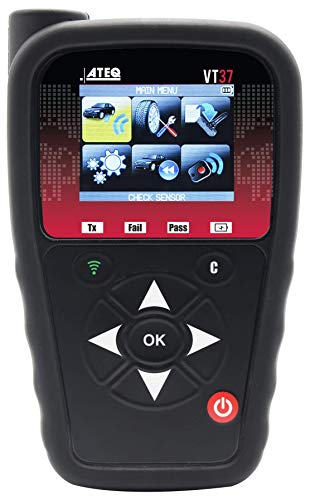
- Programs 20+ aftermarket sensor brands
- Manual and auto relearn support
- Displays relearn procedures
Best For: Broad aftermarket sensor compatibility
Tablet Companion Pick
LAUNCH X-431 i-TPMS Service Tool

- Works with LAUNCH X-431 tablets
- Programs LAUNCH LTR RF sensors repeatedly
- Supports 315/433MHz sensor service
Best For: LAUNCH tablet users and LAUNCH sensors
Feature-Rich Upgrade
Autel TS508WF TPMS Programming Tool

- Wi-Fi updating without a PC
- Quick and Advanced modes
- Autel MX-Sensor programming
Best For: Autel MX-Sensor programming with diagnostics
GM DIY Relearn Tool
EL-50448 for Chevrolet, Cadillac, GMC, Buick

- One-button TPMS relearn tool for GM vehicles
- Works best with OE/OEM and matched aftermarket sensors
- Requires a 9V battery; not included
Best For: GM owners who want a simple relearn tool for compatible sensors
All-in-One TPMS Service Tool
LAUNCH TSAP for aftermarket sensors

- Activates, reads, and relearns TPMS sensors
- Programs 40+ aftermarket sensors with 3 methods
- Supports retrofit kits, motorcycles, and dually vehicles
Best For: DIYers and small shops needing broad aftermarket TPMS support
Premium Autel TPMS Programmer
TS501 PRO for Autel MX-Sensors

- Programs Autel MX-Sensors with 4 methods
- Activates sensors and shows live TPMS data
- Supports OE and aftermarket relearn methods
Best For: Users who want a feature-rich TPMS tool centered on Autel MX-Sensors
GM Relearn Pick
VXDAS GM TPMS Reset Tool for 2006-2025
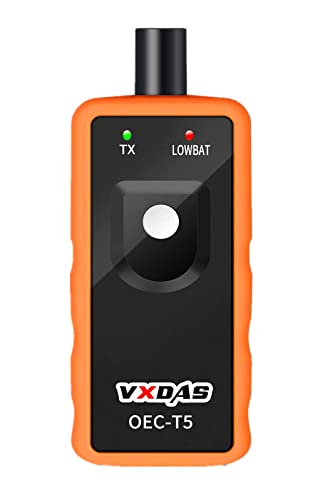
- Works with many GM vehicles using 315/433 MHz TPMS.
- Quick 1-2 minute sensor activation and relearn use.
- Battery-powered, compact tool with one-year warranty.
Best For: GM owners needing a simple relearn tool for compatible OEM-style sensors.
Full-Feature Upgrade
Autel TS508WF TPMS Tool with WiFi

- Programs Autel MX-Sensors in four ways.
- Activates, relearns, and diagnoses OE or aftermarket sensors.
- WiFi updates and rugged hard case included.
Best For: Users who want advanced TPMS programming and diagnosis with Autel MX-Sensors.
Value Autel Choice
Autel TS501 PRO TPMS Programming Tool

- Programs Autel MX-Sensors in four ways.
- Supports stationary, automatic, and OBD relearn.
- Lifetime free software updates via USB.
Best For: Buyers wanting Autel sensor programming plus broad TPMS service features.
Wi-Fi Upgrade Pick – Autel TS508WF TPMS Programming Tool
If you’re comparing TPMS programming tools for aftermarket sensors, the Autel TS508WF stands out for buyers who want a Wi-Fi-enabled handheld that can program Autel MX-Sensors without needing a PC. It combines sensor activation, relearn, and TPMS-related OBD2 diagnostics in one tool, with two service modes to make routine tire work faster.
Best For: DIYers and technicians who want a Wi-Fi TPMS tool for Autel MX-Sensors and broad relearn coverage.
Pros:
- Wi-Fi updates mean no computer is needed for software updates.
- Programs Autel MX-Sensors in four ways, including OBD copy and auto create.
- Supports Quick Mode and Advanced Mode for faster or deeper TPMS work.
- Handles activation, relearn, and TPMS-related OBD2 diagnostics.
Cons:
- Only programs Autel MX-Sensors, not other sensor brands.
- Functions are vehicle-dependent, so compatibility must be checked by VIN.
- Requires registration before first use.
For shoppers focused on aftermarket sensor service, this is a capable all-in-one TPMS tool, but the brand lock-in matters. If you use Autel MX-Sensors and want modern update convenience, it offers a strong mix of speed and coverage.
Multi-Brand Value Pick – ATEQ VT37 TPMS Sensor Tool
The ATEQ VT37 is a practical choice if you want TPMS programming tools for aftermarket sensors that support more than one sensor brand. It is built to diagnose and activate TPMS sensors, show relearn procedures, and work as a standalone reset tool for many domestic and European vehicles.
Best For: Shops and DIY users who need broad aftermarket sensor brand support in a simple handheld tool.
Pros:
- Programs over 20 leading aftermarket sensor brands.
- Supports manual and auto relearn on domestic or European vehicles.
- Can display relearn procedures to help guide TPMS reset work.
- Can pair with a bi-directional scan tool for added flexibility.
Cons:
- Basic Android 4.0 platform suggests an older hardware/software base.
- Screen size is very small at 1 inch.
- Import-vehicle support may depend on pairing with another scan tool.
If you need wider aftermarket sensor compatibility instead of being tied to one sensor line, the VT37 is a straightforward option. Its strength is coverage across many brands, especially for users who want a dedicated activation and relearn tool.
Tablet Companion Pick – LAUNCH X-431 i-TPMS Service Tool
The LAUNCH X-431 i-TPMS is designed for users already working inside the LAUNCH ecosystem who need TPMS programming tools for aftermarket sensors. It connects with compatible X-431 tablets and supports activation, reading, learning, and programming for LAUNCH RF sensors in 315/433MHz applications.
Best For: LAUNCH tablet owners who want a TPMS accessory for LAUNCH-brand aftermarket sensors.
Pros:
- Works with many LAUNCH X-431 tablets, including V, PAD, PRO, and Elite models.
- Supports 315/433MHz sensors and can program LAUNCH LTR RF sensors repeatedly.
- Can program up to 8 LAUNCH brand sensors at once.
- Includes activation, reading, learning, and programming functions.
Cons:
- Only programs LAUNCH brand sensors, not mixed aftermarket brands.
- Requires an Android device and does not support iPhone or iPad.
- Depends on compatibility with the connected X-431 tablet model.
This is a smart add-on if your shop already uses a LAUNCH scanner and you want a matching TPMS workflow. It is less universal than standalone multi-brand tools, but it fits well for users committed to LAUNCH sensors and tablets.
Feature-Rich Upgrade – Autel TS508WF TPMS Programming Tool
For buyers looking at TPMS programming tools for aftermarket sensors, this Autel TS508WF model focuses on fast updates, broad service functions, and Autel MX-Sensor programming. It adds Wi-Fi updating and combines activation, relearn, diagnostics, and sensor programming in a single handheld unit.
Best For: Users who want a Wi-Fi TPMS tool with quick/advanced modes and Autel MX-Sensor support.
Pros:
- Wi-Fi updates let you update the tool without a computer.
- Offers Quick Mode and Advanced Mode for different repair workflows.
- Programs Autel MX-Sensors with auto create or OBD copy options.
- Supports activation, relearn, and TPMS diagnostic code reading and clearing.
Cons:
- Only programs Autel MX-Sensors.
- Compatibility varies by vehicle and should be checked by VIN.
- Some features and modes are tied to supported vehicle coverage.
This version is aimed at users who want a strong mix of programming and diagnostic features in a wireless-update tool. If you are staying within the Autel sensor ecosystem, it offers a very practical service package.
GM DIY Relearn Tool – EL-50448 for Chevrolet, Cadillac, GMC, Buick
If you need a straightforward option among TPMS programming tools for aftermarket sensors on GM vehicles, this EL-50448 is built for quick relearns and TPMS warning light resets on Chevrolet, GMC, Cadillac, and Buick models. It is a one-button handheld tool meant for DIY use, with a focus on activating sensors fast without a trip to the dealer.
Best For: GM owners who want a simple, low-cost relearn tool for compatible OE/OEM sensors and many aftermarket sensors that match OEM frequency and parameters.
Pros:
- Supports 100+ GM vehicle applications, including newer models
- One-button operation with paper instructions and video tutorial
- Can reset sensors, clear TPMS lights, and help test whether a sensor is responding
- Designed to activate sensors in about 1-2 minutes at home
Cons:
- GM-only tool; not for Ford, Toyota, Nissan, Honda, or other non-GM brands
- Optimized for OE/OEM sensors, and some aftermarket sensors may not match
- Requires a 9V battery, which is not included
For GM drivers, this is a practical relearn tool rather than a full TPMS diagnostic platform. It fits the buyer who wants a basic, fast reset solution and understands that universal TPMS sensors are not the target use case.
All-in-One TPMS Service Tool – LAUNCH TSAP for aftermarket sensors
For shoppers comparing TPMS programming tools for aftermarket sensors, the LAUNCH TSAP stands out as a more complete service tool that can activate, read, and relearn sensors, while also supporting programming for 40+ aftermarket sensors. It is aimed at users who want broader TPMS coverage, including manual relearns, retrofit kits, motorcycles, and dually vehicles.
Best For: DIYers and small shops that need sensor activation plus aftermarket sensor programming, with support for multiple relearn methods and specialty vehicle use.
Pros:
- Activates and reads sensor data including ID, pressure, temperature, frequency, and battery status
- Supports 200+ manual relearns and three programming methods: Auto Create, Clone ID, and Manual Input ID
- Programs 40+ aftermarket sensors, including many major sensor brands
- Can service retrofit kits, motorcycles, and dually vehicles
Cons:
- Requires the WebVT upgrade software before use
- Battery-powered device with a 2.8-inch screen, so it is more compact than a larger shop tablet
- Coverage is broad, but compatibility still depends on the specific sensor and vehicle
This is the most flexible of the three if your priority is aftermarket sensor programming rather than a simple vehicle-specific reset. The 3 years of free updates also help it stay current as vehicle and sensor support evolves.
Premium Autel TPMS Programmer – TS501 PRO for Autel MX-Sensors
The Autel TS501 PRO is a more advanced choice in TPMS programming tools for aftermarket sensors, especially if you plan to work with Autel MX-Sensors. It combines activation, relearn, reset, and diagnostic functions in one unit, with support for common 315/433MHz MX-Sensor programming and a wide range of sensor and relearn workflows.
Best For: Users who want a feature-rich TPMS diagnostic and programming tool centered on Autel MX-Sensors and broad relearn coverage.
Pros:
- Programs Autel MX-Sensors with Auto Create, OBD Copy, Copy by Activation, and Manual Input
- Supports activation of all known sensors and reads live TPMS data like ID, pressure, temperature, battery, and frequency
- Offers Stationary, Automatic, and OBD relearn methods for OE and aftermarket sensors
- Includes TPMS reset and system diagnosis functions, plus frequent lifetime updates
Cons:
- TPMS programming is only for Autel MX-Sensors
- Requires registration and a PC software update before first use
- Without registration, use is limited to 10 times
If you want a tool that goes beyond basic activation and relearn work, the TS501 PRO brings a fuller diagnostic toolkit. Its strongest value is for buyers already committed to Autel MX-Sensors and looking for deeper TPMS service options.
GM Relearn Pick – VXDAS GM TPMS Reset Tool for 2006-2025
If you need a straightforward TPMS programming tool for aftermarket sensors on GM vehicles, the VXDAS EL50448-style reset tool is built for quick relearns rather than full sensor programming. It’s aimed at GM models using 315/433 MHz, and it’s meant to help you activate OEM-style sensors and clear TPMS alarms without a dealer visit.
Best For: GM owners who want a simple, battery-powered relearn tool for compatible 315/433 MHz vehicles.
Pros:
- Works with many GM vehicles from 2006-2025 with 315/433 MHz TPMS.
- Designed for quick 1-2 minute sensor activation and relearn use.
- Simple process: put the vehicle in TPMS Learn Mode and trigger each tire near the valve stem.
- Compact, battery-powered tool with a one-year warranty.
Cons:
- Not suitable for heavy trucks with more than 4 tires or external TPMS systems.
- Intended for original OEM sensors that are already well programmed.
- Compatibility should be checked against the model list before buying.
For GM-specific relearn jobs, this is a practical low-cost option, but it’s not a universal TPMS programming scanner. If your goal is general aftermarket sensor programming across many brands, a more advanced tool will be a better fit.
Full-Feature Upgrade – Autel TS508WF TPMS Tool with WiFi
For buyers looking at TPMS programming tools for aftermarket sensors, the Autel TS508WF stands out as a more complete diagnostic and programming option. It can program Autel MX-Sensors, activate and relearn OE or aftermarket sensors, and add TPMS diagnosis features like reading sensor data and clearing DTCs.
Best For: Shops and DIY users who want a feature-rich Autel tool for MX-Sensor programming and TPMS service work.
Pros:
- Programs Autel MX-Sensors in four ways, including Copy by OBD and Auto Create.
- Activates and relearns OE or aftermarket sensors with stationary, automatic, and OBD methods.
- Reads sensor data such as ID, pressure, temperature, battery, and position.
- WiFi free updates and comes with a rugged hard carrying case.
Cons:
- Can only program Autel MX-Sensors, not other brand sensors.
- Compatibility and supported functions vary by vehicle, so VIN checking is recommended.
- Some support details require contacting Autel directly.
This is the most capable option in the group if you want a scanner-style TPMS tool rather than a basic relearn device. Just make sure you’re planning to use Autel MX-Sensors, since that programming limitation is the main tradeoff.
Value Autel Choice – Autel TS501 PRO TPMS Programming Tool
The Autel TS501 PRO is a strong middle-ground option for TPMS programming tools for aftermarket sensors, especially if you plan to stay inside the Autel MX-Sensor ecosystem. It covers sensor activation, relearn, programming, and diagnosis, with OBD relearn support and lifetime free software updates via USB.
Best For: Buyers who want Autel MX-Sensor programming plus full TPMS relearn and diagnosis features.
Pros:
- Programs Autel MX-Sensors in four ways, including Copy by OBD and Auto Create.
- Supports stationary, automatic, and OBD relearn procedures.
- Activates most known OE and aftermarket sensors and reads key sensor data.
- Includes lifetime free software updates via USB.
Cons:
- Only programs Autel MX-Sensors, not other brands.
- Must be registered and updated before use, or it is limited to 10 uses.
- Compatibility should be verified with vehicle details and VIN.
If you want much of the TS508-style feature set without moving up to WiFi updating, this model is a sensible pick. It’s best when you’re committed to Autel sensors and want a more complete TPMS service workflow.
How We Picked the Best TPMS Programming Tools for Aftermarket Sensors
We prioritized tools with strong vehicle coverage, dependable sensor activation, relearn support, and practical programming features for common aftermarket sensor brands. We also considered ease of use, update support, wireless convenience, and whether the tool fits DIY garage work or daily shop use.
Quick Comparison
Start by matching the tool to your job: basic GM relearn tools are best for one-brand use, while full-featured TPMS scanners are better if you handle mixed makes, multiple sensor types, or frequent sensor programming. If you work on more than one platform, broad relearn and activation support usually delivers the best value.
Key Buying Factors for TPMS Programming Tools for Aftermarket Sensors
Vehicle and Sensor Coverage
Check whether the tool supports the makes you service most often, plus the sensor frequencies and brands you use. Broad coverage matters if you handle domestic, import, or fleet vehicles.
Activation, Relearn, and Programming Functions
Some tools only trigger sensors or reset the TPMS system, while others can program aftermarket sensors and guide relearn procedures. Choose based on whether you need simple maintenance, full sensor setup, or both.
Update Method and Workflow
WiFi updates, app-based pairing, and scanner integration can make a noticeable difference in speed and convenience. For shop use, faster updates and clearer prompts reduce downtime.
Special Use Cases
If you service GM vehicles only, a dedicated relearn tool can be the most cost-effective option. For more complex work, TPMS Programming Tools for Aftermarket Sensors with broader protocol support are the better long-term investment.
Who Should Buy Which TPMS Programming Tools for Aftermarket Sensors?
DIY drivers: Choose a simple relearn tool if you mainly reset sensors after rotation, replacement, or tire service.
Mobile technicians: Look for a portable tool with fast activation, broad relearn support, and aftermarket sensor programming.
Repair shops: A full-featured TPMS platform is the best fit when you need coverage across many vehicle makes and sensor brands.
GM-focused users: A dedicated GM relearn tool is ideal if you mostly work on Chevy, GMC, Buick, Cadillac, and similar platforms.
In short, buy for the vehicles you service most, then make sure the tool supports the level of programming and relearn work you actually perform.