
As a mechanic, having the right tools can make all the difference in your efficiency and accuracy. In 2026, the market offers an impressive range of automotive tablets equipped with advanced diagnostic software designed specifically for professionals like you. From extensive system diagnostics to real-time monitoring, these tablets are essential for modern vehicle maintenance. But which ones stand out regarding features and usability? Let’s explore the top contenders.
TOPDON Bidirectional Scan Tool ArtiDiag900 Lite Automotive Diagnostic Tool

If you’re a mechanic looking for a reliable diagnostic tool, the TOPDON Bidirectional Scan Tool ArtiDiag900 Lite is an excellent choice. With upgraded hardware and software, it runs on Android 11.0, featuring a fast CPU and a long-lasting 10000mAh battery. Its bidirectional control allows you to test components actively, like injectors and coolant pumps. Plus, it performs OE-level diagnostics across all vehicle modules, ensuring accurate reading and clearing of codes. Supporting 8 essential reset services, this tool covers 99% of global cars. The Bluetooth 5.0 connectivity offers a flexible, wireless diagnostic experience, making your job easier and more efficient.
Best For: The TOPDON Bidirectional Scan Tool ArtiDiag900 Lite is best for professional mechanics and automotive technicians seeking a robust and efficient diagnostic solution for a wide range of vehicles.
Pros:
- Supports bidirectional control for active testing of various components.
- Covers over 10000 cars and 60+ models, compatible with vehicles from 1996 to 2026.
- Offers 8 essential reset services, enhancing service and maintenance capabilities.
Cons:
- May have a learning curve for users unfamiliar with advanced diagnostic tools.
- Wireless range of 33 feet may not be sufficient for larger workspaces.
- Limited to Android operating system, which may not appeal to users preferring other platforms.
Autel Scanner MaxiCOM MK808S Diagnostic Tool
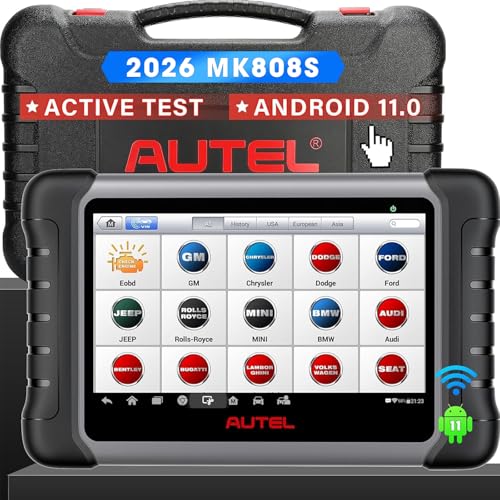
The Autel Scanner MaxiCOM MK808S Diagnostic Tool stands out as an essential asset for professional mechanics seeking advanced diagnostic capabilities. This high-end model offers bidirectional control and supports over 150 car brands, ensuring thorough coverage. With 28+ service functions, including Oil Reset and ABS Bleeding, it streamlines your workflow. The wired OBD2 connection provides faster, stable diagnostics compared to Bluetooth tools. Plus, the cost-effective subscription model saves you money, while a year of free updates keeps your software current. With 24/7 customer support and a one-year warranty, you can trust the MK808S to enhance your automotive repair efficiency.
Best For: Professional mechanics and automotive technicians seeking advanced and reliable diagnostic tools for a wide range of vehicles.
Pros:
- Supports over 150 car brands and includes 28+ service functions for comprehensive diagnostics.
- Wired OBD2 connection offers faster and more stable performance compared to Bluetooth tools.
- Cost-effective subscription model with lower annual fees and one year of free software updates.
Cons:
- Some advanced features may require a subscription after the first year for continued access.
- Limited online features may become inactive post-subscription period.
- Initial investment may be higher compared to basic diagnostic tools.
TOPDON ONE Bidirectional Scan Tool (10.1″ OBD2 Scanner)

For mechanics seeking a powerful diagnostic tool, the TOPDON ONE Bidirectional Scan Tool stands out with its impressive 10.1″ touchscreen and Bluetooth 5.0 connectivity. This OBD2 scanner offers full system scans using TopFix AI, covering over 5 million fault codes to provide instant diagnostics and repair guidance. With 50+ service functions, including ADAS calibration and ECU coding, it enhances your repair capabilities. The dual WiFi connection guarantees speedy performance, while the first year of software updates is included for free. Plus, its robust customer support and warranty add peace of mind for your investment.
Best For: Professional mechanics and automotive technicians looking for an advanced diagnostic tool to enhance their repair capabilities and efficiency.
Pros:
- Comprehensive Coverage: Supports over 5 million fault codes and 50+ service functions, providing extensive diagnostic capabilities.
- User-Friendly Interface: Features a large 10.1″ touchscreen for easy navigation and a responsive user experience.
- Enhanced Connectivity: Dual WiFi technology ensures a stable and fast connection for efficient diagnostics.
Cons:
- Subscription Cost: After the first year, software updates require a paid subscription, which may be a drawback for budget-conscious users.
- Weight: At 3.47 pounds, it may be heavier compared to some other diagnostic tools, making it less portable.
- Limited Warranty Details: Warranty information is only available through Amazon, which may not be convenient for all users.
Innova 5610 OBD2 Bidirectional Scan Tool

Mechanics and DIY enthusiasts looking for a reliable diagnostic tool will find the Innova 5610 OBD2 Bidirectional Scan Tool invaluable. It’s perfect for troubleshooting issues with live data on ABS, SRS, transmission, and engine systems. You’ll appreciate its bidirectional controls, allowing you to test functions like the fuel pump and electronic parking brake. With support for English, Spanish, and French, it’s user-friendly and compatible with most OBD2 vehicles from 1996 to 2023. Plus, you get free updates and access to ASE-Certified support, ensuring you stay equipped for advanced repairs and vehicle maintenance.
Best For: The Innova 5610 OBD2 Bidirectional Scan Tool is best for DIY enthusiasts and professional mechanics seeking reliable vehicle diagnostics and advanced repair capabilities.
Pros:
- Enhanced data stream provides real-time insights into critical vehicle systems like ABS, SRS, and engine performance.
- Bidirectional controls enable testing of various functions, enhancing troubleshooting efficiency.
- User-friendly design supports multiple languages and is compatible with a wide range of OBD2 vehicles.
Cons:
- Limited to OBD2 vehicles; may not be suitable for older models or non-OBD2 compliant vehicles.
- Some advanced features may require additional knowledge or experience to utilize effectively.
- While updates are free, ongoing compatibility with new vehicle models may depend on future software updates.
BLCKTEC 460T OBD2 Scanner Car Code Reader

Engine diagnostics can be a game changer for automotive professionals, and the BLCKTEC 460T OBD2 Scanner delivers just that. This versatile tool performs engine, ABS, SRS, and transmission diagnostics while supporting all 10 OBD2 modes. You can read and clear codes, access real-time live data, and utilize over 12 reset functions like Oil Maintenance and TPMS Relearn. With AutoVIN technology and lightning-fast speed, it scans vehicle ECUs automatically. The RepairSolutions2 app enhances its capabilities, providing access to a wealth of repair information. Plus, you’ll benefit from lifetime updates and dependable customer support, making it a must-have for your toolkit.
Best For: Automotive professionals and DIY enthusiasts looking for a comprehensive diagnostic tool for OBD2-compliant vehicles.
Pros:
- Wide Compatibility: Works on all OBD2-compliant vehicles in the USA and Canada from 1996 onward.
- Multi-Functionality: Supports engine, ABS, SRS, and transmission diagnostics along with 12+ reset functions.
- User-Friendly Features: AutoVIN technology and AutoScan streamline the diagnostic process, while the RepairSolutions2 app offers extensive repair resources.
Cons:
- Limited to OBD2 Vehicles: Cannot diagnose vehicles that do not comply with OBD2 standards.
- Potential Learning Curve: Users unfamiliar with diagnostic tools may need time to fully utilize all features.
- No Subscription Service for Advanced Features: While it offers many tools, some advanced features may require additional purchases or subscriptions for ongoing access.
BlueDriver Bluetooth Pro OBDII Scan Tool for iPhone & Android

The BlueDriver Bluetooth Pro OBDII Scan Tool stands out as an essential tool for DIY car enthusiasts and professional mechanics alike, thanks to its compatibility with gas vehicles from 1996 onward. This tool diagnoses over 7,000 issues, including check engine, ABS, and airbag problems without any subscription fees. You’ll appreciate the enhanced diagnostics, allowing you to read and clear trouble codes, while the live data feature provides real-time health monitoring. Plus, with its user-friendly app and wireless Bluetooth connection, accessing repair videos and 24/7 support is a breeze. It’s a reliable companion for effective vehicle maintenance.
Best For: DIY car enthusiasts and professional mechanics looking for an affordable and comprehensive vehicle diagnostic tool.
Pros:
- No subscription fees for access to diagnostic features and repair reports.
- User-friendly app with wireless Bluetooth connectivity for easy operation and access to repair videos.
- Real-time health monitoring allows for enhanced diagnostics and understanding of vehicle performance.
Cons:
- Limited to gas vehicles manufactured from 1996 onward, excluding older models and diesel vehicles.
- Some advanced features may require a learning curve for less tech-savvy users.
- While it provides extensive diagnostics, it may not cover every specific vehicle issue unique to certain makes and models.
THINKCAR Bidirectional Scan Tool (THINKSCAN 689BT)

For those seeking a powerful diagnostic tool, the THINKCAR Bidirectional Scan Tool (THINKSCAN 689BT) stands out with its bi-directional OBD2 scanning and advanced ECU coding capabilities. This tool runs on an Android 10 platform and boasts impressive speed, thanks to its 4-core CPU, 4GB RAM, and 64GB ROM. You’ll benefit from OE-level diagnostics across all systems and access over 3000 active tests. With support for 34 services and wireless updates, it’s versatile and efficient. Plus, you can customize settings and enjoy responsive user support available in 28 languages. Make sure to check compatibility with your vehicle before purchase!
Best For: Automotive technicians and car enthusiasts looking for an advanced and versatile diagnostic tool for comprehensive vehicle diagnostics and customization.
Pros:
- OE-level diagnostics across all systems, providing detailed insights into vehicle performance.
- Supports over 3000 active tests for effective troubleshooting and maintenance tasks.
- Offers wireless updates with no subscription fees, ensuring the tool stays current without extra costs.
Cons:
- Coding functions may vary by model and year, which could limit some users’ capabilities.
- Compatibility should be checked before purchase, potentially causing concerns for specific vehicle owners.
- The complexity of some advanced functions may require a learning curve for new users.
GEARWRENCH 7″ Wireless Bi-Directional Diagnostic Scanner Tablet | GWSMART07

When it comes to reliable diagnostics, the GEARWRENCH 7″ Wireless Bi-Directional Diagnostic Scanner Tablet | GWSMART07 stands out as an essential tool for professional mechanics. Weighing just under 5 pounds, it’s portable and easy to use. With OE level diagnostics, you can perform full system scans and access 38 reset functions. Its bidirectional control allows you to send commands directly to the ECU, ensuring thorough testing. The built-in WiFi and backlit LCD touchscreen enhance usability, while the 8MP camera aids in diagnostics. Plus, you’ll appreciate the 2-year warranty and 3 years of free software updates.
Best For: Professional mechanics and automotive technicians looking for a reliable, portable diagnostic tool with advanced capabilities.
Pros:
- OE level diagnostics enable comprehensive full system scans and access to manufacturer fault codes.
- Bidirectional control allows for active tests on various vehicle components, enhancing troubleshooting efficiency.
- User-friendly features such as a backlit LCD touchscreen and built-in WiFi improve usability in various conditions.
Cons:
- The annual fee for software updates after the initial three years may be a consideration for budget-conscious users.
- Limited battery life may necessitate frequent charging during extensive diagnostic sessions.
- The weight of nearly 5 pounds may be cumbersome for some users who prefer lighter devices.
FOXWELL NT301 OBD2 Scanner Diagnostic Code Reader Tool

Equipped with advanced diagnostic capabilities, the FOXWELL NT301 OBD2 Scanner is ideal for both professional mechanics and DIY enthusiasts looking to troubleshoot vehicle issues effectively. This compact tool reads and clears fault codes, checks emissions readiness, and resets monitors with ease. You’ll appreciate the live data graphing feature that highlights suspicious trends in vehicle sensors. Its plug-and-play design connects simply via the OBD2 port, while the one-click readiness key guarantees quick diagnostics. With a 1-year warranty and lifetime updates, the FOXWELL NT301 is a reliable choice for anyone needing efficient and straightforward vehicle diagnostics.
Best For: Professional mechanics and DIY enthusiasts seeking an efficient and user-friendly vehicle diagnostic tool.
Pros:
- Reads and clears fault codes easily, helping users troubleshoot issues effectively.
- Live data graphing feature allows for monitoring of vehicle sensor trends in real-time.
- Plug-and-play design with quick access buttons ensures straightforward diagnostics without complications.
Cons:
- Limited compatibility as it does not support ABS, SRS, or transmission systems.
- Not usable with Mac or iOS systems, restricting access for users with those devices.
- May require updates through Windows, which could be inconvenient for some users.
XTOOL D7 Bidirectional Scan Tool
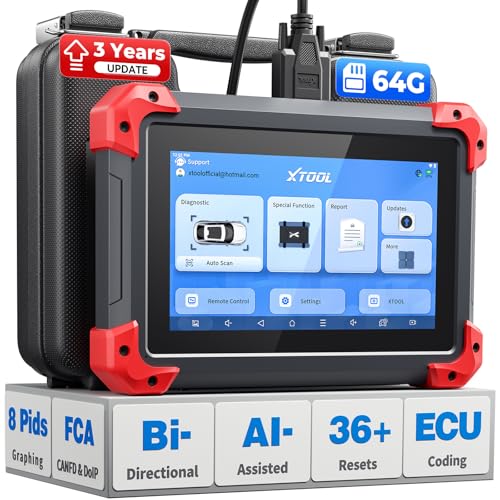
The XTOOL D7 Bidirectional Scan Tool is an essential companion for professional mechanics seeking advanced diagnostic capabilities. With over 4,000 active tests and 36+ special functions, it guarantees thorough vehicle coverage for more than 100,000 models. The true bidirectional control allows you to command components while monitoring sensor responses in real-time, giving you an edge over budget scanners. Its upgraded 64GB storage and 5000mAh battery support all-day use. Plus, you’ll appreciate the live data graphing and support for 24 languages. Enjoy peace of mind with a 2-year warranty and reliable customer support for any issues you encounter.
Best For: Professional mechanics and automotive enthusiasts looking for advanced diagnostic tools for extensive vehicle coverage.
Pros:
- True bidirectional control allows for real-time monitoring and command of vehicle components.
- Supports over 100,000 vehicle models and provides more than 4,000 active tests for thorough diagnostics.
- User-friendly features, including live data graphing and support for 24 languages, enhance usability.
Cons:
- Initial investment may be higher compared to basic budget scanners.
- Advanced features may have a steeper learning curve for inexperienced users.
- Continued software updates require a renewal fee after the first three years.
Factors to Consider When Choosing Automotive Tablets With Diagnostic Software
When you’re picking an automotive tablet with diagnostic software, consider its diagnostic capabilities and features first. You’ll also want to check the connectivity options, as well as how user-friendly the interface is. Finally, make sure it covers a wide range of vehicles and has solid software update policies to keep your device current.
Diagnostic Capabilities and Features
Choosing the right automotive tablet for diagnostics can greatly enhance your efficiency as a mechanic, especially if you focus on key features that matter most. Look for diagnostic tools that offer bidirectional control, allowing you to send commands to vehicle components for active testing, which streamlines troubleshooting. Scanners that provide OE-level full system diagnostics will enable you to read and clear codes across all vehicle modules, including Engine and ABS systems. Make certain the device supports essential reset services like Oil Resets and Throttle Adaptation for effective maintenance. Advanced data viewing capabilities, such as live data monitoring, are vital for analyzing real-time performance. Finally, evaluate compatibility with a wide range of vehicle makes and models to cover diverse servicing needs.
Connectivity Options Available
Understanding connectivity options is just as important as the diagnostic capabilities of automotive tablets. You’ll find that many models offer both wired and wireless connections. Wired OBD2 connections typically deliver faster, more stable diagnostics compared to Bluetooth. However, Bluetooth 5.0 enables wireless diagnostics within a range of up to 33 feet, giving you flexibility in your workspace. Some tablets also feature dual WiFi connections for quicker data transfer and enhanced stability. Additionally, certain tools support J2534 pass-thru functionality, allowing you to connect with OEM software for advanced diagnostics. Finally, user-friendly applications capitalize on wireless connectivity, letting you access live data, repair reports, and software updates without extra subscriptions, making your work more efficient.
User Interface and Usability
A user-friendly interface is essential for maximizing the effectiveness of automotive tablets with diagnostic software. A responsive touchscreen enhances your diagnostic experience, allowing you to navigate functions quickly and efficiently. Features like real-time data graphing and live data access offer clear visual representations of vehicle performance, making it easier for you to spot issues. Multilingual support broadens accessibility, ensuring that users from diverse backgrounds can benefit. Clear visual indicators and logical menu layouts contribute to a smoother experience, reducing the learning curve for new users. Additionally, the ability to customize settings and preferences allows you to tailor the tool to fit your specific workflow, improving usability and making diagnostics more intuitive.
Vehicle Compatibility Range
When it comes to selecting an automotive tablet with diagnostic software, considering the vehicle compatibility range is essential. Some tools only support specific vehicle years or regions, so you’ll want to choose one that covers a broad spectrum. Look for diagnostic tools compatible with over 10,000 car models, ideally from 1996 to 2026. Make sure the scanner supports necessary protocols like OBD-II to effectively communicate with various makes and models. If you work with particular brands, consider tablets offering specialized functions for those vehicles, as they can enhance your efficiency. Always verify the manufacturer’s compatibility claims to avoid investing in a tool that won’t meet your service needs.
Software Update Policies
Choosing the right automotive tablet also involves looking at software update policies. You’ll find that these policies vary widely. Some tools offer free updates for one to three years, while others require annual subscriptions for access to new features. Check if updates are automatic or if you’ll need to manually initiate them, as this impacts usability. Some manufacturers provide lifetime free updates, which can save you money if you plan to use the tool long-term. Additionally, consider the frequency of updates, as some brands commit to regular updates to keep up with the latest vehicle technologies. Understanding the terms, including any potential costs after the initial period, is essential for evaluating the long-term value of your diagnostic tool.
Warranty and Support Services
Warranty and support services play an essential role in your decision-making process when selecting an automotive tablet with diagnostic software. Look for a warranty that covers defects in materials and workmanship for one to two years, protecting your investment. You’ll also want to make sure the tablet offers free software updates for at least a year, with options for continued access to keep up with new vehicle models. Thorough customer support, ideally available 24/7, can be invaluable for troubleshooting. A generous return policy, typically around 30 days, lets you test the product risk-free. Some manufacturers even offer lifetime free updates and support, which can greatly enhance the tablet’s long-term value, keeping you ahead in the evolving automotive landscape.
Cost-Effectiveness and Value
Understanding warranty and support services is just one part of making a smart choice for your automotive tablet. When evaluating cost-effectiveness, focus on the initial purchase price versus the diagnostic functions offered. Verify it meets your specific needs without unnecessary features. Also, consider subscription fees for software updates; tools with lower annual fees or free updates can save you money in the long run. Assess the warranty and customer support options, as longer warranties can reduce future repair costs. Compare coverage for vehicle makes and models; a scanner that supports a wider range can eliminate the need for multiple tools. Finally, look for additional features like live data monitoring at no extra cost, enhancing functionality and saving on service expenses.
Battery Life and Performance
When it comes to automotive tablets with diagnostic software, battery life and performance play an essential role in your overall efficiency. Look for tablets with a 10,000mAh battery, which can provide up to 12 hours of continuous use, allowing you to tackle diagnostics without interruption. Performance is equally important; faster CPUs can process data and run diagnostics up to five times quicker than older models. Fast charging capabilities are a must, too, as a 2500mAh battery at 7.3V can recharge quickly, minimizing downtime. Additionally, tablets with dual WiFi connectivity guarantee a stable, rapid wireless experience. Don’t forget a robust battery management system that optimizes usage, enhancing longevity for those extended service sessions.