
If you’re looking to upgrade your GM vehicle’s audio system, steering wheel control interfaces are essential for maintaining your factory features. You want a seamless integration that allows you to keep using your steering wheel controls, OnStar settings, and even backup camera support. With various options available, it’s vital to choose the right one for your model. Let’s explore the top choices that can truly enhance your driving experience.
PAC RP5-GM11 Radio Replacement Interface for Select GM Vehicles

If you’re looking to upgrade your audio system while keeping the convenience of your factory features intact, the PAC RP5-GM11 Radio Replacement Interface is an excellent choice for select GM vehicle owners. This interface is compatible with various models from 2000 to 2013, including Buick, Cadillac, Chevrolet, and more. You’ll retain essential features like your Bose amplifier, OnStar functionality, and steering wheel controls. Installation is a breeze with plug-and-play harnesses and pre-loaded software, ensuring you won’t have to reprogram anything. Plus, the USB-updatable module keeps your system current, making it a smart investment for any GM vehicle.
Best For: Vehicle owners looking to upgrade their audio systems in select GM models while retaining factory features.
Pros:
- Retains factory features such as Bose amplifier, OnStar functionality, and steering wheel controls for a seamless experience.
- Easy installation with plug-and-play harnesses and pre-loaded software that eliminates the need for reprogramming.
- USB-updatable module allows for convenient firmware updates, keeping your system up to date.
Cons:
- Limited compatibility to select GM models from 2000 to 2013, which may exclude some vehicle owners.
- Additional accessories like the TOSLINK output for digital audio may require separate purchases, increasing overall costs.
- Excludes certain functionalities such as OnStar text messaging, which may be a drawback for some users.
CRUX SOOGM-16 Radio Replacement Interface for Select GM Vehicles
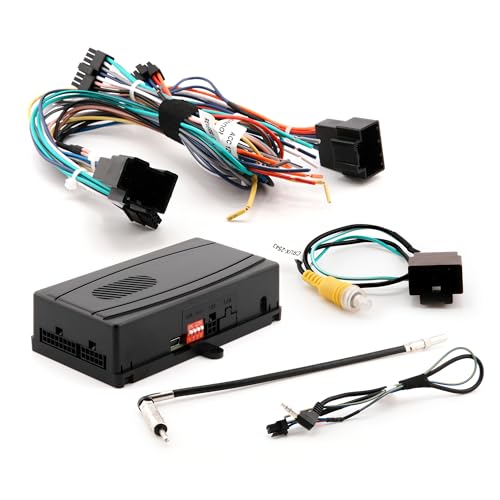
The CRUX SOOGM-16 Radio Replacement Interface is ideal for GM vehicle owners looking to upgrade their audio system without losing essential factory features. Designed for select GM LAN 29-Bit vehicles from 2006 to 2014, it seamlessly integrates with both standard and premium Bose amplified systems, as well as non-amplified ones. You’ll appreciate that it retains factory OnStar functionality, warning chimes, and your steering wheel controls through a built-in pre-programmed interface. With the included module harness, installation is straightforward, ensuring you can enjoy your new audio system while keeping those vital original features intact.
Best For: GM vehicle owners (2006-2014) who want to upgrade their audio system while retaining essential factory features.
Pros:
- Retains factory OnStar functionality and warning chimes, ensuring safety and convenience.
- Compatible with various audio systems, including standard and premium Bose, as well as non-amplified setups.
- Easy installation with the included module harness, making it accessible for DIY enthusiasts.
Cons:
- Limited to select GM LAN 29-Bit vehicles from 2006 to 2014, which may exclude some users.
- May require additional adapters for certain aftermarket radios, potentially increasing installation complexity.
- Functionality may vary based on the specific vehicle model and audio system configuration.
Scosche GM2K-WP Stereo Replacement Interface Adapter for Select GM Vehicles

For GM vehicle owners looking to upgrade their audio systems without sacrificing functionality, the Scosche GM2K-WP Stereo Replacement Interface Adapter stands out as an ideal solution. This adapter is compatible with select 2000-2013 GM vehicles and seamlessly integrates into your factory radio harness. With plug-and-play functionality, installation is a breeze, and you’ll retain your steering wheel controls and OEM amplifier. It supports modern features like Apple CarPlay and Android Auto, ensuring reliable audio reproduction. Plus, Scosche backs it with lifetime tech support and a limited warranty, making it a trusted choice for your car audio upgrade.
Best For: GM vehicle owners seeking an easy upgrade to their car audio systems while retaining factory functionalities.
Pros:
- Seamless integration with factory radio harness for a straightforward installation.
- Retains steering wheel controls and supports modern features like Apple CarPlay and Android Auto.
- Backed by lifetime tech support and a limited warranty from a trusted brand.
Cons:
- Compatibility limited to select 2000-2013 GM vehicles, which may exclude some models.
- Requires basic installation knowledge for optimal setup, which could be a challenge for inexperienced users.
- Performance may vary based on the specific aftermarket stereo system used.
Metra Axxess ASWC-1 Steering Wheel Control Interface
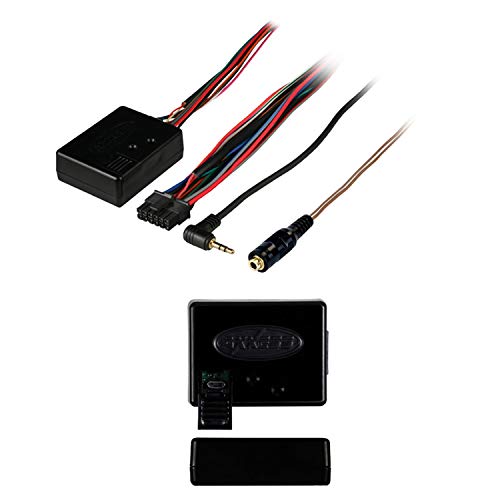
Upgrade your driving experience with the Metra Axxess ASWC-1 Steering Wheel Control Interface, perfect for those who want seamless audio control without sacrificing convenience. This interface works with major radio brands like Pioneer, Kenwood, and Eclipse, automatically detecting your vehicle and programming the controls. You won’t have to worry about compatibility issues, as it identifies your radio type for smooth integration. Plus, with the micro B USB update feature, you can keep it current with the latest technologies. Its non-volatile memory guarantees your settings are saved, even if your vehicle’s battery disconnects. Enjoy enhanced control on the road!
Best For: Drivers seeking a hassle-free way to integrate steering wheel controls with their audio systems for enhanced convenience and functionality.
Pros:
- Auto detects vehicle and radio type for easy setup.
- Updateable via micro B USB to stay compatible with new technologies.
- Non-volatile memory retains settings even when the vehicle’s battery is disconnected.
Cons:
- May not support all vehicle models or aftermarket radios.
- Initial setup may require some technical knowledge.
- Limited to specific radio brands, potentially excluding others.
Axxess AXSWC Steering Wheel Control Interface

When you want seamless integration of your GM vehicle’s steering wheel controls, the Axxess AXSWC Steering Wheel Control Interface stands out as an excellent choice. This versatile interface eliminates the need for additional devices by handling all functions in one unit. It’s compatible with all major radio brands and automatically detects your vehicle type and radio connections. You can even dual assign steering wheel control buttons for added convenience. Installation is a breeze, simplifying both setup and operation. Plus, you can customize button assignments to suit your preferences, making your driving experience more enjoyable and efficient.
Best For: Drivers who want a seamless and customizable integration of steering wheel controls in their GM vehicles.
Pros:
- Compatible with all major radio brands, ensuring versatility and ease of use.
- Automatic detection of vehicle type and radio connections simplifies installation.
- Customizable button assignments allow for personalized control settings.
Cons:
- May require manual programming for some vehicles, which could be time-consuming.
- Dual assignment of buttons might confuse users unfamiliar with the interface.
- Compatibility may vary based on specific vehicle models, limiting its universal appeal.
NuIth Radio Replacement Interface for Chevy and GMC Vehicles
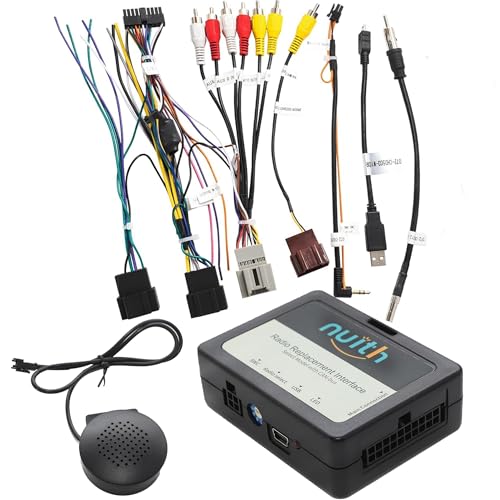
The NuIth Radio Replacement Interface is an ideal solution for Chevy, GMC, and Cadillac owners looking to seamlessly replace their OEM radios with aftermarket options. This interface retains essential functionalities like Steering Wheel Controls, Factory OnStar Settings, and Backup Camera Function, ensuring a smooth changeover. Compatible with a wide range of models from 2006 to 2017, it works with major aftermarket brands like Sony and Pioneer. Installation is straightforward, whether you have a Bose system or a non-amplified setup. With a customer rating of 3.9 stars, it’s a reliable choice for upgrading your vehicle’s audio experience.
Best For: Chevy, GMC, and Cadillac owners seeking an easy way to upgrade their audio systems with aftermarket radios while maintaining essential factory functionalities.
Pros:
- Retains key functionalities such as Steering Wheel Controls, OnStar settings, and Backup Camera Function.
- Compatible with a wide range of models from 2006 to 2017, providing versatility for various vehicle owners.
- Works with major aftermarket brands like Sony, Pioneer, and more, ensuring flexibility in audio upgrades.
Cons:
- Customer rating of 3.9 stars indicates mixed reviews, suggesting potential issues for some users.
- Limited to non-amplified vehicles or specific amplified systems, which may exclude some users.
- Installation may require technical knowledge, making it less accessible for those unfamiliar with car audio systems.
PAC SWI-RC Steering Wheel Control Interface for Major Radio Brands

For those seeking seamless integration of steering wheel controls with their aftermarket radios, the PAC SWI-RC Steering Wheel Control Interface stands out as an excellent choice. Compatible with over 3000 vehicles and major radio brands, it simplifies control retention with customizable button functions. This interface works on various systems, including CAN-Bus and analog, providing a reliable 12-volt accessory output. While it excels in compatibility, be mindful of its limitations with specific Kenwood and Pioneer models. With a solid 4.0-star rating and a 30-day return guarantee, you can trust the PAC SWI-RC to enhance your driving experience considerably.
Best For: Those looking for a reliable and customizable solution to retain steering wheel controls when upgrading to an aftermarket radio in their vehicle.
Pros:
- Wide Compatibility: Supports over 3000 vehicles and works with major radio brands.
- Customizable Functions: Allows for short press, long press, and button reassignment for personalized control.
- Reliable Output: Provides a 12-volt accessory output for various automotive systems.
Cons:
- Compatibility Limitations: Not compatible with specific Kenwood and Clarion models, as well as certain JVC models.
- Pioneer Restrictions: Some Pioneer units may not support radio preset seeking or Bluetooth volume control for calls.
- Voice Recognition Limitations: Only a limited number of Pioneer models support voice recognition via wired remote input.
Pac Universal Analog Can-Bus Steering Wheel Control Interface Swicp2

Designed for easy integration, the Pac Universal Analog Can-Bus Steering Wheel Control Interface (SWICP2) stands out as a top choice for anyone looking to enhance their GM vehicle’s audio system. With plug-and-play installation, it works seamlessly with most aftermarket receivers and today’s popular vehicles. You’ll appreciate its configuration options, allowing you to set it up via DIP switches or the ControlPRO app on your PC, iOS, or Android device. The button learning mode makes customizing your controls a breeze. Plus, the 2 Amp, 12V ACC output streamlines your data-bus applications, saving you time and enhancing your driving experience.
Best For: The Pac Universal Analog Can-Bus Steering Wheel Control Interface (SWICP2) is best for GM vehicle owners looking to upgrade their audio system with seamless integration and customizable controls.
Pros:
- Plug-and-play installation makes setup quick and easy.
- Compatible with most aftermarket receivers and popular vehicles.
- Button learning mode allows for customizable button functions.
Cons:
- May require additional configuration for certain vehicles.
- Direct PC connection needed for some features, which could be inconvenient.
- Limited to analog and data SWC systems, potentially excluding some vehicles.
Scosche LPGM35 Link+ Stereo Replacement Interface Adapter for GM Vehicles
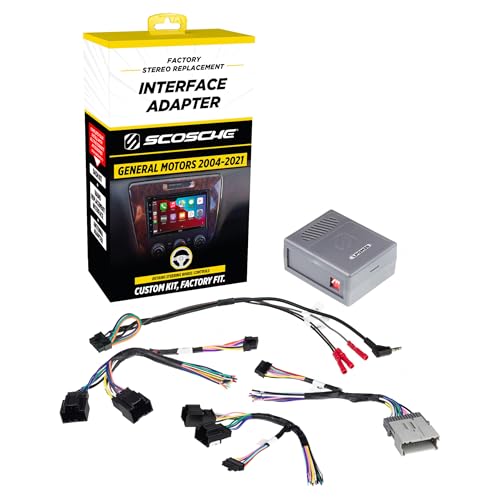
Integrating an aftermarket stereo into your GM vehicle has never been easier, especially if you’re looking to retain essential features like steering wheel controls. The Scosche LPGM35 Link+ Stereo Replacement Interface Adapter seamlessly connects your new stereo with the factory radio harness in select 2004-2021 GM models. It’s designed for factory-amplified premium sound systems, ensuring you keep your safety chimes and controls intact. With a power adapter for reliable access and improved sound quality, this adapter weighs just 6.4 ounces and comes with Scosche’s Limited Lifetime Warranty, making it a trusted choice for enhancing your driving experience.
Best For: Those looking to integrate an aftermarket stereo into their GM vehicle while retaining steering wheel controls and factory features.
Pros:
- Seamless integration with factory radio harness for select 2004-2021 GM vehicles.
- Retains essential features like steering wheel controls and safety chimes for safe operation.
- Backed by a Limited Lifetime Warranty and lifetime tech support from a trusted brand.
Cons:
- Not compatible with OnStar or Digital “Premium Bose” Systems (RPO codes: Y91/Y92/Z75).
- Limited to certain GM models, potentially excluding some users with other vehicle brands.
- Installation may require basic wiring knowledge for optimal setup.
Genuine GM Steering Wheel Radio Bluetooth Audio Control Switch (25851951)

The Genuine GM Steering Wheel Radio Bluetooth Audio Control Switch (25851951) stands out as an essential upgrade for any GM vehicle owner looking to enhance their driving experience. This OEM part is a direct replacement, ensuring a perfect fit for your steering column. With this switch, you can effortlessly control your radio while keeping your hands on the wheel. It’s specifically designed for models from 2009-2014, making it a reliable choice. You’ll only need one unit to get started, and its straightforward installation means you won’t have to worry about complicated setups. Elevate your audio control today!
Best For: This product is best for GM vehicle owners from 2009-2014 seeking an easy way to control audio functions while driving.
Pros:
- Genuine OEM part ensures high quality and compatibility with your vehicle.
- Direct replacement design allows for easy installation without extensive modifications.
- Enhances driving safety by allowing hands-free control of audio settings.
Cons:
- Limited to specific models (2009-2014) which may not suit owners of older or newer vehicles.
- Single unit requirement means if you need multiple switches, you’ll have to purchase additional units.
- Installation may still require basic tools and knowledge, which could be challenging for some users.
Factors to Consider When Choosing Steering Wheel Control Interfaces for GM
When choosing a steering wheel control interface for your GM vehicle, consider compatibility with your specific model to guarantee seamless integration. You’ll also want to keep factory features intact and think about how easy the installation will be. Additionally, check how well the interface works with aftermarket radios and whether it can be updated in the future.
Compatibility With Vehicle Models
Choosing the right steering wheel control interface for your GM vehicle requires careful consideration of compatibility with your specific model and year. Different GM models have unique wiring and data bus systems, so it’s crucial to confirm compatibility. Many interfaces are designed for a range of GM vehicles from 2000 to 2014, but some may cover even broader compatibility across various brands. If your vehicle has an amplified or non-amplified audio system, verify the interface supports it for seamless integration. Additionally, check that it works with your aftermarket radio, as different brands and models may demand specific interfaces. Prioritizing these factors will enhance your driving experience by guaranteeing everything functions smoothly.
Retained Factory Features
Maintaining factory features is a key consideration in selecting a steering wheel control interface for your GM vehicle. You’ll want to keep essential functionalities, such as steering wheel controls, so you can adjust audio without reaching for the aftermarket radio. Many interfaces also retain OnStar functionality, ensuring you can continue using this significant safety and communication system. Additionally, preserving factory warning chimes is important for receiving alerts about your vehicle’s status after the stereo upgrade. Some interfaces even allow you to maintain rear seat audio/video controls, keeping your passengers entertained. Plus, compatibility with backup sensors and cameras means your safety features stay operational, giving you peace of mind as you enjoy your new audio system.
Installation Ease
Installing a steering wheel control interface for your GM vehicle can be a straightforward process if you consider a few key factors. First, look for plug-and-play options that minimize extensive wiring modifications. This simplifies the setup and saves you time. Choose interfaces that follow standard wire color codes, so connecting to existing factory wiring is clear and easy. Products with built-in pre-programmed settings also eliminate manual reprogramming, making installation hassle-free. Confirm the interface is compatible with both factory amplified and non-amplified systems, giving you versatility across different vehicle types. Finally, opt for interfaces with USB update capabilities, allowing you to keep the device compatible with new technologies and features as they arise.
Functionality With Aftermarket Radios
When upgrading your GM vehicle with an aftermarket radio, it’s important to contemplate how well the steering wheel control interface will integrate with your new system. Look for interfaces that retain essential functions like volume control, track selection, and voice commands, as these features greatly enhance your driving experience. Ascertain compatibility with both amplified and non-amplified sound systems, catering to various audio setups. Customizable button assignments can add convenience by allowing you to tailor controls to your preferences. Additionally, check for automatic vehicle detection features, which simplify installation by removing the need for manual programming. Choosing the right interface can make a world of difference in how seamlessly you enjoy your new radio.
Update Capability
Having an up-to-date steering wheel control interface can greatly enhance your driving experience in a GM vehicle. The update capability is vital, as it allows for firmware updates that guarantee compatibility with new vehicle models and technologies. Look for interfaces that feature USB ports, making it easy to connect to your PC for updates. Regular updates not only improve performance but also expand the range of compatible aftermarket radios. Additionally, some interfaces retain custom settings thanks to non-volatile memory, offering a seamless user experience. Staying updated helps prevent compatibility issues with newer audio systems, so you can maintain peak performance. Prioritizing update capability will keep your driving experience smooth and enjoyable.
User Interface Options
Keeping your steering wheel control interface updated is just the beginning; you also need to contemplate user interface options to maximize functionality. Look for customizable button assignments that let you personalize controls for volume, track selection, and phone calls. Many interfaces offer dual assignment, enabling you to program different functions for short and long presses, which adds convenience. Some also feature built-in pre-programmed setups that automatically detect your vehicle type and compatible radios, making installation easier. Additionally, consider interfaces with a button learning mode, allowing you to teach the system specific functions by pressing your desired buttons. Finally, ascertain compatibility with both analog and data steering wheel control systems to enhance audio control across a broad range of vehicles.
Brand Reliability and Support
How can you guarantee you’re selecting a reliable steering wheel control interface for your GM vehicle? Start by choosing brands known for their reliability. These brands typically offer better customer satisfaction and longer-lasting products. Look for interfaces that come with lifetime warranties and solid tech support; this shows a commitment to quality. Check customer ratings and reviews, as higher scores often reflect better performance. Brands that provide regular firmware updates keep their products compatible with emerging technologies, which enhances longevity. Additionally, consider those that offer installation guides and customer support resources, as these can make your installation smoother. Remember, a reliable interface not only improves your driving experience but also gives you peace of mind.